








Getting started
Spreelytics has two HTTP APIs. The Tracking API records what happens on your site: pageviews, custom events, sign-ins and the end of each visit. It is the API the tracking script talks to, and you can call it yourself. The reporting API reads your data back, the same numbers the app shows, and makes the changes an endpoint allows, such as saving a dashboard or adding a goal. A third route, Record a payment, takes payments from your server.
This page covers what the endpoint pages have in common: where each API lives, which key it takes, the audience id, dates, filters, errors and limits.
The two APIs
| Tracking API | Reporting API | |
|---|---|---|
| Base URL | https://sdk.spreelytics.com/1.0 | https://app.spreelytics.com, followed by a path prefix (see Reporting API basics) |
| What it does | Records pageviews, custom events, identify calls and session ends. Reads one visitor's visit counts. | Reads reports, visitors, sessions, people and notifications. Creates and changes dashboards, reports, segments, references and notification rules, and creates goals and funnels. |
| Credential | The audience's client key, which is public | A secret key: an audience key or an account key |
| Where the key goes | clientKey in the query string or in the form body | The header Authorization: Bearer <key> |
| Reference pages | Track a pageview, Track an event, Identify a visitor, End a session, Get visitor stats | The Endpoints pages, starting with Get the headline numbers |
Record a payment has an address of its own,
POST https://api.spreeflo.com/1.0/revenue, and takes an account key.
Tracking API basics
Every tracking route sits under https://sdk.spreelytics.com/1.0, so /track/page means
https://sdk.spreelytics.com/1.0/track/page. If you send the script's calls through your own
domain (see Proxy guide), your proxy forwards them to this address.
The client key
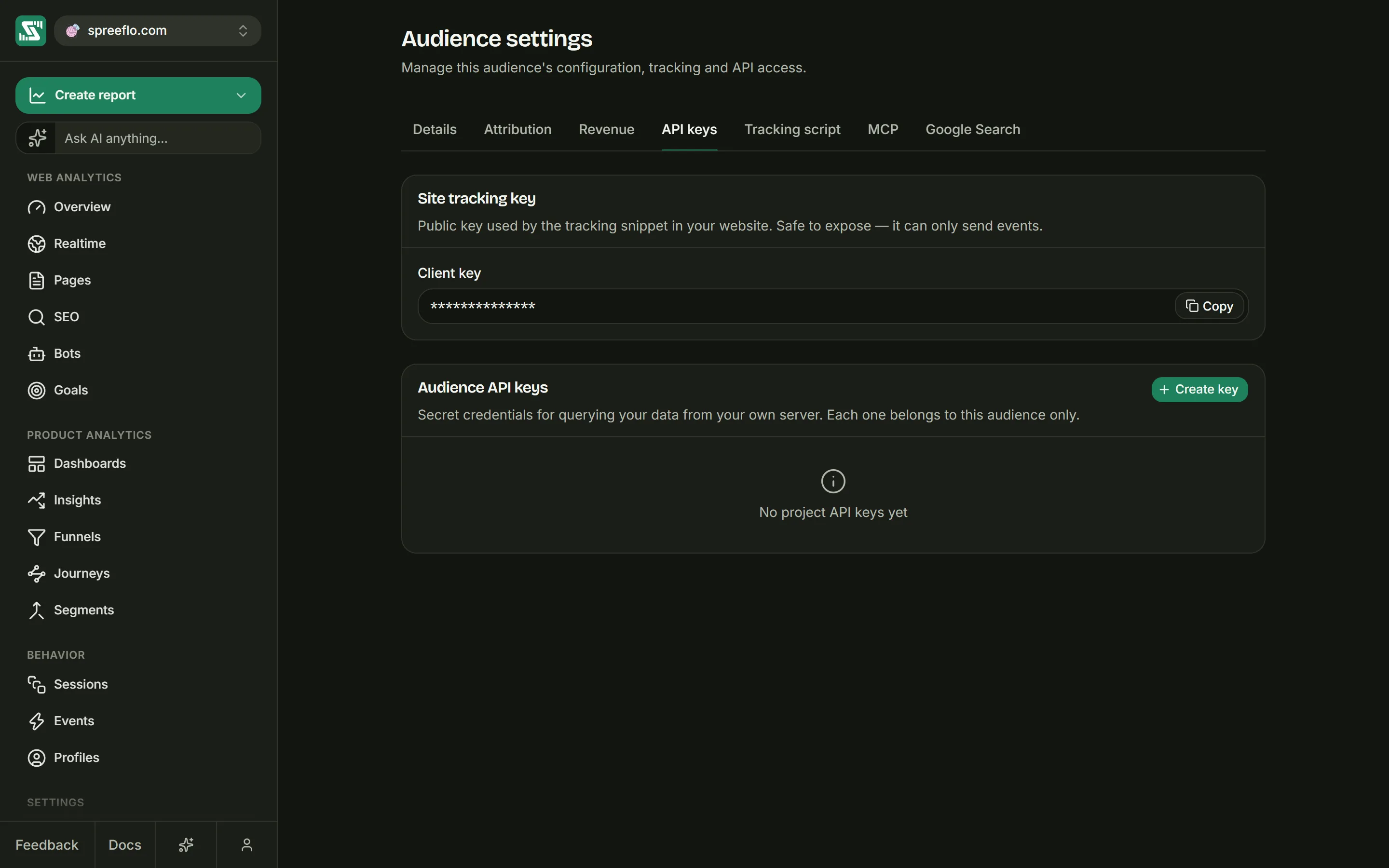
Each tracking call carries the audience's client key. You find it in Settings → API keys, under Site tracking key, in the Client key field. It is also inside the snippet on Settings → Tracking script.
The client key is public by design. It sits in your page source where anyone can read it, and all it allows is sending data to that one audience. It cannot read your reports, and it does not work on the reporting API.
Two ways to send the body
Every tracking route that takes a body accepts it in two encodings:
| Encoding | Content-Type | Body | Where the client key goes |
|---|---|---|---|
| Form, as the script sends it | application/x-www-form-urlencoded | Two fields: clientKey, and data, which holds the JSON payload as a string | The clientKey form field |
| JSON | application/json | The JSON payload itself | The query string: ?clientKey=YOUR_CLIENT_KEY |
The form encoding exists for browsers. Before a browser sends a JSON request to another site, it
makes an extra permission check called a CORS preflight: an OPTIONS request that asks the server
whether the real request is allowed. A form-encoded request needs no preflight, so it takes one round
trip instead of two. The collector accepts both encodings, and lets any site send them; which sites
it records is up to Allowed domains, described below.
On Track a pageview, Track an event and
Identify a visitor, the JSON payload must not contain clientKey. Those routes
reject any field they do not know with 400, and clientKey is not one of their fields.
End a session is the exception: its payload requires clientKey.
What a tracking call answers
Tracking calls are recorded in the background. A call answers before its data is stored, and the data shows up in the app shortly after.
| Answer | What it means |
|---|---|
200 with an empty body | Accepted. |
200 with the body OK | Dropped on purpose and not stored. See What the Tracking API drops. |
400 | A required field is missing, a field has the wrong type, or the payload has a field the route does not accept. The JSON answer has "message": "Request validation failed" and names each problem under fields. |
401 with the body Event API: Unauthorised | No client key, a client key that does not exist, or a call from a site that is not in Allowed domains. The body is the same in all three cases. |
413 | The body is larger than 250,000 bytes. |
500 | In the form encoding, data is not valid JSON. |
Allowed domains lives in Settings → Details, and appears when Allow all domains is
off. When the list has entries, the collector reads the hostname from the request's Origin header,
or from Referer when there is no Origin, and refuses the call with 401 unless that hostname is
on the list exactly. www.example.com and example.com are separate entries, and there are no
wildcards. A browser sends Origin by itself; a call from a server has to add it.
What the Tracking API drops
Three filters run before a tracking call is stored. A dropped call still answers 200, with the
body OK, so that a bot running your page's code has no reason to retry. Nothing about the call is
kept, and there is no setting to turn these filters off.
- Bots and tools. Every request names the program that sent it in its User-Agent header. When
that name belongs to a crawler, a fetcher, a command line tool or an HTTP library, the call is
dropped. That covers curl, Wget, HTTPie, PowerShell, Python's requests, httpx and urllib, axios,
node-fetch, undici, the Go and Java HTTP clients, OkHttp, Guzzle, Postman and many more. A
User-Agent that contains
headless,lighthouse,phantomjs,puppeteerorplaywrightis dropped as well. - Cloud addresses. A call from an IPv4 address in the published ranges of Amazon Web Services,
Google Cloud, Oracle Cloud, DigitalOcean or Linode is dropped, apart from ranges that VPN services
use, so people browsing through a VPN still count. The address checked is the one that connects to
Spreelytics. An
X-Forwarded-Forheader is ignored. Many servers and serverless functions run on these clouds (Vercel, for example, runs on AWS), and every tracking call they make is dropped. - The hard limit. Once your workspace has recorded three times its monthly event allowance (one and a half times, on allowances above 1 million events), new pageviews and custom events are dropped. Identify calls and session ends still go through. See Billing.
More on how filtered traffic affects your reports in Filter traffic.
Calling the Tracking API from a server
The tracking routes are built for browsers. From a browser, the visitor's own address, User-Agent
and Origin travel with each call, and everything works as it does for the script. From a server,
check each of these first:
- Where the server runs. If it is on Amazon Web Services, Google Cloud, Oracle Cloud, DigitalOcean or Linode, every call is dropped. Nothing in the request can change that.
- The User-Agent. Send the User-Agent of the visitor you are reporting on, copied from their request to your server. Your HTTP library's own User-Agent is dropped as a bot, and the visitor's is also where the browser, operating system and device type in your reports come from.
- The
Originheader. If the audience has Allowed domains, send anOriginwhose hostname is on the list, such ashttps://www.example.com. - Location. Country, region and city come from the address the call arrives from, which is your server's. Every visitor you report from the server is placed where the server is.
- Cookieless audiences. With cookieless tracking on, the collector ignores the visitor and session ids you send and works them out from the request's address and User-Agent. Every call from your server shares one address, so visitors whose browsers send the same User-Agent would be counted as one. Send server-side calls only to audiences that use the cookie.
Reporting API basics
The reporting API lives on https://app.spreelytics.com, under three path prefixes. Each endpoint
page shows the full address in its samples.
| Prefix | What it serves |
|---|---|
/api/v1/event | Web analytics: headline numbers and breakdowns, pages, events, sessions, visitors, retention and journeys, and the results of goals and funnels |
/api/v1/spreelytics | People, dashboards, reports and charts, segments (called cohorts in the API), insights, references, notification rules and notifications, the event catalog and plan usage |
/api/v1/spree | Goals and funnels, and the list of your audiences |
Send the key in the Authorization header, never in the address:
curl 'https://app.spreelytics.com/api/v1/event/analytics/web-analytics/summary?contactListId=8f14e45f-ceea-4e7a-9b2c-1d5a3f6b7c8d&startDate=2026-09-01&endDate=2026-09-30' \
  -H 'Authorization: Bearer YOUR_ACCOUNT_KEY' \
  -H 'x-spreeflo-app: spreelytics'
The x-spreeflo-app header
Send x-spreeflo-app: spreelytics with every reporting call that uses an account key, as the app
itself does. The name is historical, and the value tells the server the call is for Spreelytics.
Without it, a workspace you joined through an invitation can refuse your account key, with 401
under /api/v1/event and /api/v1/spreelytics and 410 under /api/v1/spree, and the audience
list can leave that workspace's audiences out. Audience keys do not need the header.
Keys
The reporting API takes two kinds of secret key. Both go in the same header,
Authorization: Bearer <key>.
| Audience key | Account key | |
|---|---|---|
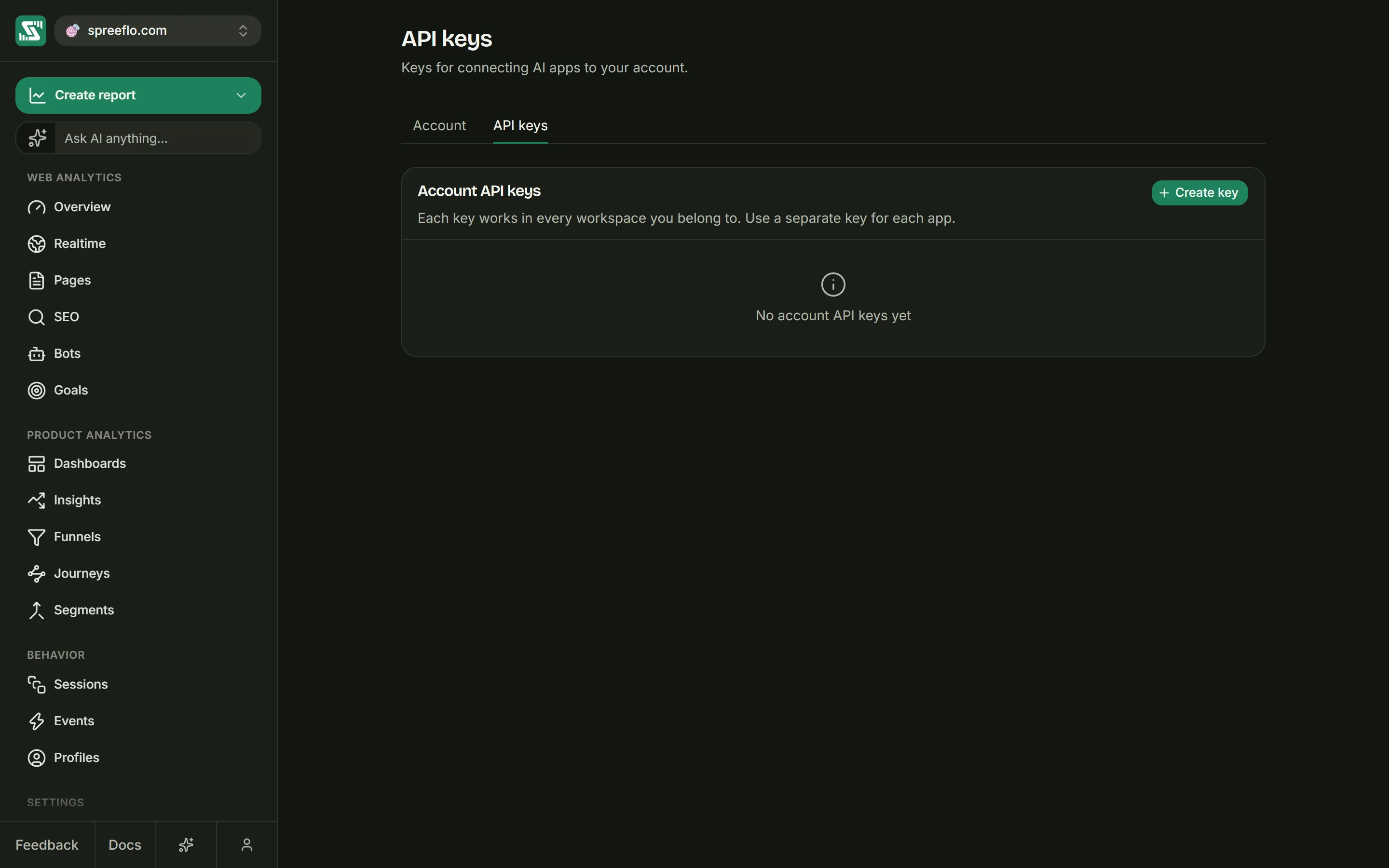
| Where to create it | Settings → API keys, under Audience API keys, with Create key | Account → API keys, under Account API keys, with Create key |
| Who can create it | Admins of the workspace | Anyone signed in, for themselves |
| What it reaches | The one audience it was created in | Every workspace you belong to |
| What it can do | Read, nothing else | What your role allows in each workspace: a Viewer reads, an Editor or Admin can also make the changes an endpoint allows |
| What it looks like | Starts with sp_ | A short code of capital letters and digits |
| Seeing it again | Shown once, when you create it. Only a hash of it is stored, so a lost key has to be replaced. | Shown any time with Show key, and copied with Copy key in its row menu |
| Typical use | A reporting script or a server that reads one site | Your own scripts and servers, MCP, and Record a payment |
Revoke in a key's row menu turns it off for good. Give each tool its own key, so you can revoke one without breaking the others. Treat both kinds as passwords: keep them on your server, out of browser code, out of addresses and out of source control.
Which endpoint takes which key
Every endpoint on the Endpoints pages has a Keys line that says which kinds it accepts.
- Endpoints under
/api/v1/eventnever take audience keys. - Audience keys open a set of read endpoints under
/api/v1/spreelytics: people, saved dashboards, reports, segments and references, charts, the event catalog, insights, plan usage, and notification rules and notifications. An audience key used for any other audience, or on an endpoint that does not list it, answers401. - An endpoint whose Keys line says none works only from inside the app, signed in.
Which workspace a call acts on
An endpoint that takes an audience id acts on the workspace that owns that audience, and your role in
that workspace decides what you may do. An endpoint that takes no audience id, such as plan usage,
acts on one workspace that the call has to pick: name it with the header
X-Team-Id: <workspace id>. Without the header, the workspace you get depends on the endpoint, so
send it whenever you use an account key on one of these. Record a payment works
a little differently, and its page explains how. The next section shows where workspace ids come
from.
Your audience id
Endpoints that read or change one audience take its id as contactListId.
Record a payment calls the same value audienceId. It is a UUID, a 36-character
id such as 8f14e45f-ceea-4e7a-9b2c-1d5a3f6b7c8d.
The app does not show audience ids. There are two ways to get them:
- From an AI app. Once an AI app is connected over MCP, ask it to list your
audiences. Its
sply_list_audiencestool answers with each audience's name, domain and id. - From the API.
GET https://app.spreelytics.com/api/v1/spree/contact/listwith an account key lists the audiences in every workspace you belong to.page(starting at 0) andpageSizeare required.searchnarrows the list to names that contain it, ignoring case. AddX-Team-Idto list one workspace only.
In the answer, id is the audience id, teamId is the id of the workspace that owns it (the value
X-Team-Id takes), and timezone is the audience's Reporting timezone.
Request
curl 'https://app.spreelytics.com/api/v1/spree/contact/list?page=0&pageSize=50' \
  -H 'Authorization: Bearer YOUR_ACCOUNT_KEY' \
  -H 'x-spreeflo-app: spreelytics'
// On your server: an account key must never reach a browser.
const res = await fetch('https://app.spreelytics.com/api/v1/spree/contact/list?page=0&pageSize=50', {
  headers: {
    Authorization: 'Bearer YOUR_ACCOUNT_KEY',
    'x-spreeflo-app': 'spreelytics',
  },
});
const { content: audiences } = await res.json();
import requests

res = requests.get(
    "https://app.spreelytics.com/api/v1/spree/contact/list",
    params={"page": 0, "pageSize": 50},
    headers={
        "Authorization": "Bearer YOUR_ACCOUNT_KEY",
        "x-spreeflo-app": "spreelytics",
    },
)
audiences = res.json()["content"]
Response
{
  "totalPages": 1,
  "totalItems": 1,
  "page": 0,
  "size": 50,
  "content": [
    {
      "id": "8f14e45f-ceea-4e7a-9b2c-1d5a3f6b7c8d",
      "name": "Marketing site",
      "domain": "www.example.com",
      "timezone": "Europe/London",
      "teamId": "c9f0f895-fb98-4b91-9f2d-6a1e0b2c3d4e",
      "teamName": "Acme"
    }
  ]
}
Audience keys cannot call this endpoint, and do not need to: an audience key belongs to one audience, so use that audience's id with it.
Dates
Endpoints that report on a period take startDate and endDate, in either of two forms:
| Form | Example | How it is read |
|---|---|---|
| A date | 2026-09-01 | The whole day, in UTC. The end date is included. |
| A date and time | 2026-09-01T04:00:00Z | That exact moment, in UTC. It must end in Z, and may carry fractions of a second. The end moment is not included. |
So startDate=2026-09-01&endDate=2026-09-30 covers all of September, from midnight UTC on the 1st to
midnight UTC on 1 October. UTC (Coordinated Universal Time) is the time zone with no offset, and these
parameters are always read in it, whatever the audience's Reporting timezone. To report on days in
another time zone, send exact moments: September in New York is
startDate=2026-09-01T04:00:00Z&endDate=2026-10-01T04:00:00Z.
Endpoints that return a series also take granularity, the size of each step: minute, hour,
day, week or month.
When your workspace has gone past its monthly event allowance, endpoints under /api/v1/event cut
the period off at the moment it did, the same way the app does. See Billing.
Filters
Endpoints that take filter narrow their answer the way the Filter button does in the app. The
value is a JSON array of conditions, sent URL-encoded in the query string. Each condition is an array
of a field, a list of values and an optional operator:
[
  ["country", ["US", "GB"]],
  ["channel", ["Organic Search"], "is"],
  ["page", ["/blog"], "startsWith"]
]
That filter keeps visits from the United States or the United Kingdom that came from organic search,
on pages whose path starts with /blog. With curl, --data-urlencode does the encoding for you:
curl -G 'https://app.spreelytics.com/api/v1/event/analytics/web-analytics/summary' \
  -H 'Authorization: Bearer YOUR_ACCOUNT_KEY' \
  -H 'x-spreeflo-app: spreelytics' \
  --data-urlencode 'contactListId=8f14e45f-ceea-4e7a-9b2c-1d5a3f6b7c8d' \
  --data-urlencode 'startDate=2026-09-01' \
  --data-urlencode 'endDate=2026-09-30' \
  --data-urlencode 'filter=[["country",["US","GB"]],["page",["/blog"],"startsWith"]]'
Fields
| Field | Values |
|---|---|
page, entry_page, exit_page | A page path, such as /pricing |
hostname | A hostname, such as www.example.com. Compared in lower case. |
event_name | A custom event name |
goal_id | A goal's id. Keeps the people who completed the goal. |
cohort_id | A segment's id. Keeps the segment's members. |
channel | A channel as the app names it, such as Organic Search, Paid Social or Direct |
referrer_source | A source, such as Google or ChatGPT |
referrer | A referring address without https://, such as news.ycombinator.com/item |
utm_source, utm_medium, utm_campaign, utm_content, utm_term | The value of that UTM tag |
country | A two-letter country code, such as US |
region, city | A region or city name |
browser, browser_version, os, os_version | A browser or operating system, such as Chrome or Windows, and a version such as 129.0 |
screen_size | Desktop, Mobile or Tablet |
identified | ["true"] keeps identified people only, ["false"] anonymous visitors only. Takes no operator. |
Operators
| Operator | Keeps values that |
|---|---|
is | Equal one of the values. Used when you leave the operator out. |
isNot | Equal none of the values |
contains, notContains | Contain one of the values, or none of them. Ignores case. |
startsWith, endsWith | Start or end with one of the values. Ignores case. |
regex, notRegex | Match one of the patterns, or none of them |
isNull, isNotNull | Are empty, or are not. Pass an empty list of values: ["utm_source", [], "isNull"]. |
Patterns for regex use RE2 syntax, a common regular expression dialect with no lookahead,
lookbehind or backreferences. A pattern that uses them, or that is not a valid expression, is refused
with 400. A condition with a pattern longer than 500 characters is ignored.
How conditions combine
- Every condition has to match. Each field can appear once; if you repeat one, the last condition for it wins.
- Inside one condition, any of the values can match, except for
isNot,notContainsandnotRegex, where none of them may. - A filter that is not valid JSON is ignored as a whole, and so is a condition with an unknown field or no usable values. The answer is then wider than you meant, with no error to warn you, so check the JSON before you trust the numbers.
Pages of results
Lists that come in pages take page, which starts at 0, and pageSize. They answer with the rows in
content, alongside page, size, totalItems and totalPages. To read everything, ask for page
0, then keep going until page reaches totalPages - 1.
Errors
Errors from /api/v1/event and /api/v1/spreelytics look like
{ "error": "Event API: FORBIDDEN", "message": "..." }, except 401, which is the plain text
Event API: Unauthorised. Errors from /api/v1/spree and from
Record a payment look like
{ "status": 403, "title": "Forbidden", "detail": "..." }.
| Status | When |
|---|---|
400 | A parameter is missing or malformed: an audience id that is not a UUID, an unusable regex pattern, a body that does not match the endpoint. Under /api/v1/spree, also a call that names no workspace when none can be worked out. |
401 | No key, a key that does not exist or was revoked, an audience key used outside its audience or on an endpoint that does not take it, or an account key for an audience in a workspace you do not belong to. |
403 | Your role in that workspace is too low for the change, for example This action needs the editor role. |
404 | Under /api/v1/event and /api/v1/spreelytics: an item you asked for by id, such as a dashboard or a report, does not exist. |
410 | Under /api/v1/spree and for payments, the same case: the goal, funnel or audience does not exist, or is in a workspace the call does not act on. |
413 | The body is too large. |
429 | Too many requests in flight at once. See Limits. |
With an account key, an audience id that is a valid UUID but matches no audience is not an error
under /api/v1/event: the answer is empty, as if the audience had no data.
Limits
- Requests in flight. Under
/api/v1/spree, and for Record a payment, each person can have 10 requests running at once across all of their account keys. The eleventh answers429withToo many concurrent requests. Please try again later.This limits how many run at the same time, not how many you make: requests sent one after another never reach it. - Endpoints under
/api/v1/eventand/api/v1/spreelyticsdo not limit how many requests a key makes. - Body size. Request bodies under
/api/v1/eventand/api/v1/spreelytics, and on the Tracking API, can be up to 250,000 bytes. - Plan allowance. Past three times your monthly event allowance, the Tracking API drops new pageviews and events. Past the allowance itself, reports stop at the moment it ran out. See Billing.
Related
- Track a pageview: the first Tracking API route, with full request samples.
- Get the headline numbers: the first of the Endpoints pages, one per endpoint.
- MCP: connect an AI app to your data with an account key.
- Audience settings: where the client key, audience keys and Allowed domains live.