








Docs·Usage
Cookieless tracking
By default the tracking script keeps a little data in each visitor's browser, so it can recognise them when they come back. Cookieless mode stores nothing at all and recognises visitors from each request instead, one day at a time. This page lists exactly what is stored in each mode, so you can decide, and so you can show it to whoever handles privacy at your company.
What the default mode stores
Everything is first-party: it lives on your own domain, and the script sets nothing on any other. The
names start with spreelytics_, apart from one cookie that is deleted the moment it is written.
| Name | Kind | What it holds | How long it lasts |
|---|---|---|---|
spreelytics_vid | Cookie | The anonymous visitor id: vid_ followed by a random UUID. | 365 days, renewed on every page load, so it expires a year after the last visit |
spreelytics_visitor | Local storage | When this browser was first seen, and whether its first visit has ended. This is how new visitors are told apart from returning ones. | Until the visitor clears it |
spreelytics_session_data | Session storage | The current visit: its id, when it started, its last activity, the address of its first page, counts of pages and interactions, and active time. | Until the tab is closed |
__sf_cookie_probe | Cookie | The value 1, written and deleted at once while the script works out which domain the visitor cookie can go on. | Deleted immediately |
spreelytics_replay | Session storage | Only with session replay on: marks a visit whose recording has started sending. | Until the tab is closed |
The spreelytics_vid cookie has Path=/ and SameSite=Lax. By default its Domain is your registrable
domain, so your subdomains share it. IP addresses, localhost and hostnames without a dot get a
cookie on the exact hostname instead, and the cookie_domain option changes the rule (see
JavaScript SDK). The cookie is not HttpOnly, because the script writes it with
JavaScript, and it is not Secure.
The script sends the visitor id to Spreelytics inside its requests. The cookie itself is not sent to Spreelytics, because it belongs to your domain, unless you pass your site's cookies on through a proxy (see Proxy guide). There are no third-party cookies.
What happens to IP addresses
Visitors' IP addresses are not stored with your data. Spreelytics uses the address for a moment at its edge: to look up the visitor's country, region, city, time zone and approximate coordinates, which are stored; to drop traffic from data-center networks; and, on a cookieless audience, to compute the daily hash described below. None of these keeps the address.
The one exception is the request log of our collection servers, which currently records the address and the browser's user agent of each request.
Cookieless mode
Turning it on
Open Settings → Tracking script and find Cookieless tracking. The Enable switch needs the Admin role, and is disabled for an audience that has no tracking key yet.
Clicking it opens a confirmation, Turn on cookieless tracking?, which lists the consequences and warns that "Numbers from before and after this change are not comparable." Click Turn on. Turning it off works the same way, through Turn cookieless tracking off? and Turn off.
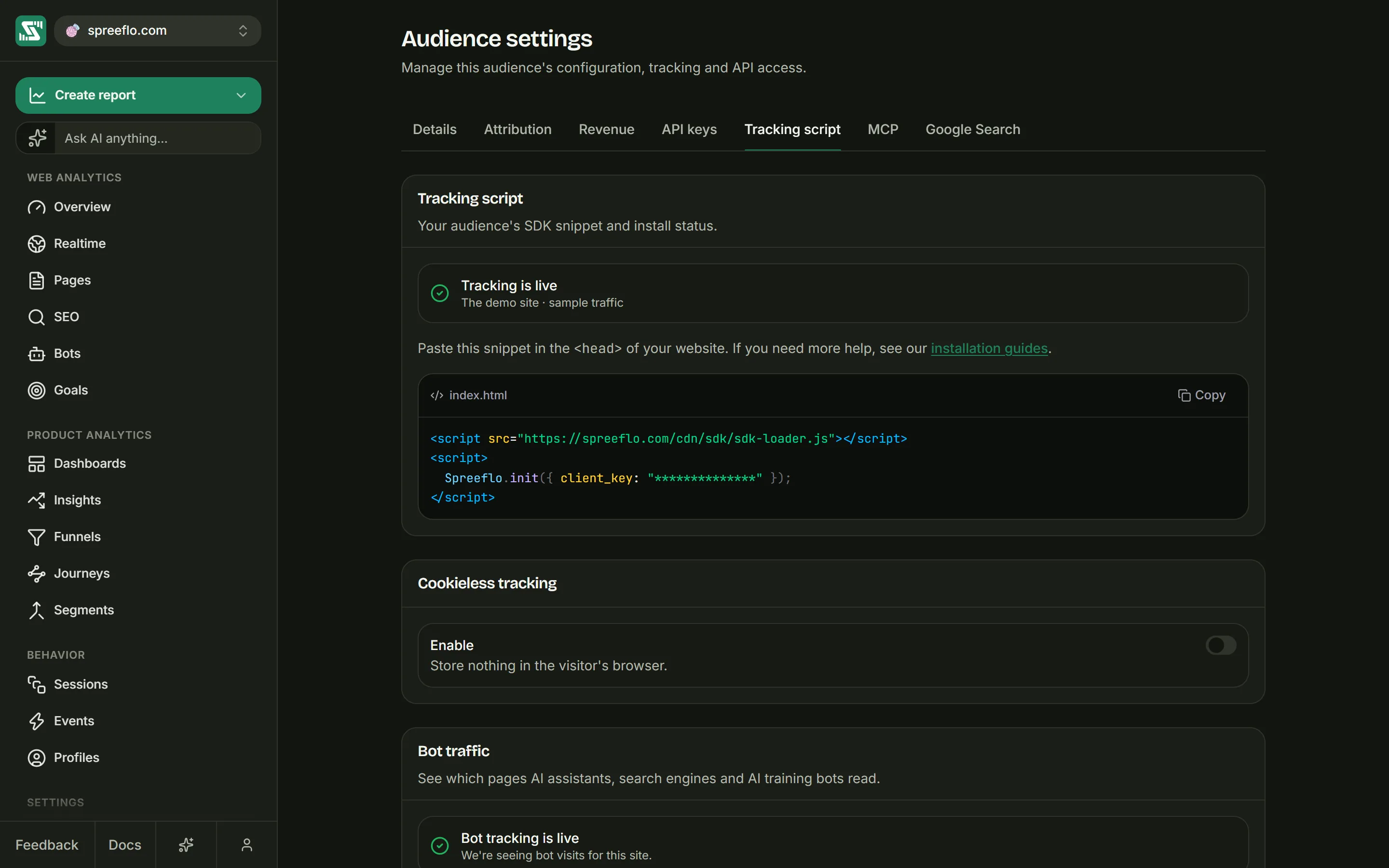
Your site needs no change: the snippet and the key stay the same. On every page load, before it stores anything, the script asks Spreelytics which mode the audience is in.
How long it takes
The answer to that question can be reused for up to a minute, so allow a minute for every visitor's browser to follow the switch. The app says as much when you save. If the answer takes longer than 2.5 seconds, or the request is blocked, the script uses the default mode for that page load. On a cookieless audience Spreelytics still works out visitors on its own side, so the numbers stay right, but that browser does get the cookie.
On every page load in cookieless mode, the script also removes anything the default mode left behind:
the spreelytics_vid cookie, spreelytics_visitor in local storage and spreelytics_session_data
in session storage.
How visitors are recognised
In cookieless mode the browser keeps nothing between page loads. The current visit lives in the page's
memory and is gone when the page closes. For each request, Spreelytics works out the visitor instead:
it takes the day's salt, the audience, the visitor's IP address and their browser's User-Agent
string, and runs them through a one-way hash (SHA-256). The result is the visitor id.
The salt changes at midnight UTC, so the same person gets a different id every day, and nothing in the product joins one day to the next. Spreelytics checks a request against today's salt and yesterday's, and uses yesterday's only to find a visit that is still going, so a visit in progress at midnight is not cut in two. Nothing reaches back further than that.
A privacy review will ask about one limit. The salt is not drawn at random and then thrown away: it is worked out from a long-lived secret and the date. The good side is that there is no store of salts anywhere to leak or to hand over. The other side is that the separation between one day and the next depends on that secret and on what we do with it, not on something the mathematics puts out of reach. If your assessment needs linking across days to be impossible, this design falls short.
Visits work differently too. Spreelytics follows each visit on its own side: a visit carries on while requests keep arriving less than 30 minutes apart, only a pageview can start one, and a second tab joins the visit that is already going. A visit's length is the time from its first request to its last, not the visible time the default mode counts.
Two people on the same network address with the same browser, browser version and operating system, such as two colleagues in one office, look like one visitor. In return, because the hash depends only on the audience and the request, the same person is recognised across your subdomains with no cookie to share.
What it costs
Recognising a returning visitor is what the cookie was for, so everything that depends on it changes:
- Anonymous visitors count as new every UTC day, so unique visitors over a range of several days read higher. That is a change in counting, not growth.
- Retention and segments cover identified people only, and only from the day you called
identify(), not their visits before it. - Funnels and attribution that span more than one day lose their anonymous completions. A visitor who arrives from an ad on Monday and buys on Tuesday counts as two visitors, and Tuesday's visit takes the credit.
- Goals over a range of several days read higher for anonymous visitors, who count once for every day they convert.
reset()cannot separate two people who share a computer (see JavaScript SDK).getVisitorId()returnsnullon each page until Spreelytics has answered the signal the script sends when it starts.
Pageviews and the bounce rate are counted the same way as before. Sources, channels, goals, revenue, the API, MCP and AI crawler tracking all keep working.
People you have identified are joined up from that moment on, across days and devices. Their visits from before you identified them are not joined to them: each of those days had its own anonymous id, and nothing links them. If you need a person's earlier history, identify them as early as you can.
It cannot be combined with a proxy
Before and after the switch
Switching does not rewrite past data. Numbers from before and after the change are counted under different rules, so they are not comparable: a jump in unique visitors on the day you turn it on is the new way of counting, not new traffic.
Session replay
Session replay records only visitors tracked with the cookie. A
cookieless audience records nothing, and neither does a visitor started with cookieless: true or a
browser that sends Global Privacy Control. What visitors type into forms, and email addresses on the
page, are masked before anything leaves the browser.
Recording a visit is a different question from counting it. Regulators in the EU and the UK treat session replay as needing consent, with or without cookies, so nothing on this page about counting without cookies carries over to it. If you hold the cookie back until a visitor accepts (the first way below), replay waits for that yes too, and starts from the next page they open.
Do you need a consent banner?
We cannot tell you that. It depends on where you and your visitors are, on everything else your site collects and on how you use the data, so ask whoever handles privacy at your company. This page lists exactly what is stored: show it to them.
Cookieless mode does not settle the question by itself. It stores nothing in the browser, but it still
processes each visitor's IP address and User-Agent to recognise them within a day.
The script does not read Do Not Track or Global Privacy Control signals to decide what it counts. Only session replay reads one: a browser that sends Global Privacy Control is never recorded. If you show a cookie banner, there are two ways to connect it:
- Count everyone, and use the cookie only after a yes. Start the script with
cookieless: trueuntil the visitor accepts, then callallowCookies()(see JavaScript SDK). Visitors who have not answered, and visitors who reject, are counted the way this page describes for a cookieless audience, so that part of your traffic carries the costs listed above. Do not callidentify()for a visitor who rejected. The proxy warning above applies here too. - Count nobody without a yes. Load the script only after the visitor agrees (see Loading from code). Visits that end before an answer are not counted.
Related
- Tracking script: install the script and check that it works.
- Identify users: join visits to people, which matters more on a cookieless audience.
- Proxy guide: why a proxy and cookieless mode do not mix.