








Docs·Usage
AI crawler tracking
AI assistants, search engines and AI training bots read your site by fetching its pages directly.
They do not run JavaScript, so the tracking script never sees them. @spreelytics/ai-crawl is a
small package that runs on your server instead: it recognises these crawlers by name and reports each
visit to Spreelytics, where it shows up on the Bots page and in the Bot traffic card on the
Overview. Crawls are kept apart from your visitor numbers.
Why it runs on your server
A crawler asks your server for a page and reads the HTML it gets back. It never executes the tracking script in that page, so from the script's point of view the visit never happened. The only place a crawler's visit can be seen is the server that answered it, which is where this package sits. It reads each request's user agent, the short text in which a crawler names itself, and reports the ones that belong to a known crawler. Requests from people are ignored before any network call.
The report is sent in the background. It never delays or changes the response your server sends.
Install
npm i @spreelytics/ai-crawl
It has no dependencies. It needs Node 18 or later, or an edge runtime with the standard fetch,
Request and Headers, such as Cloudflare Workers, Deno or Bun.
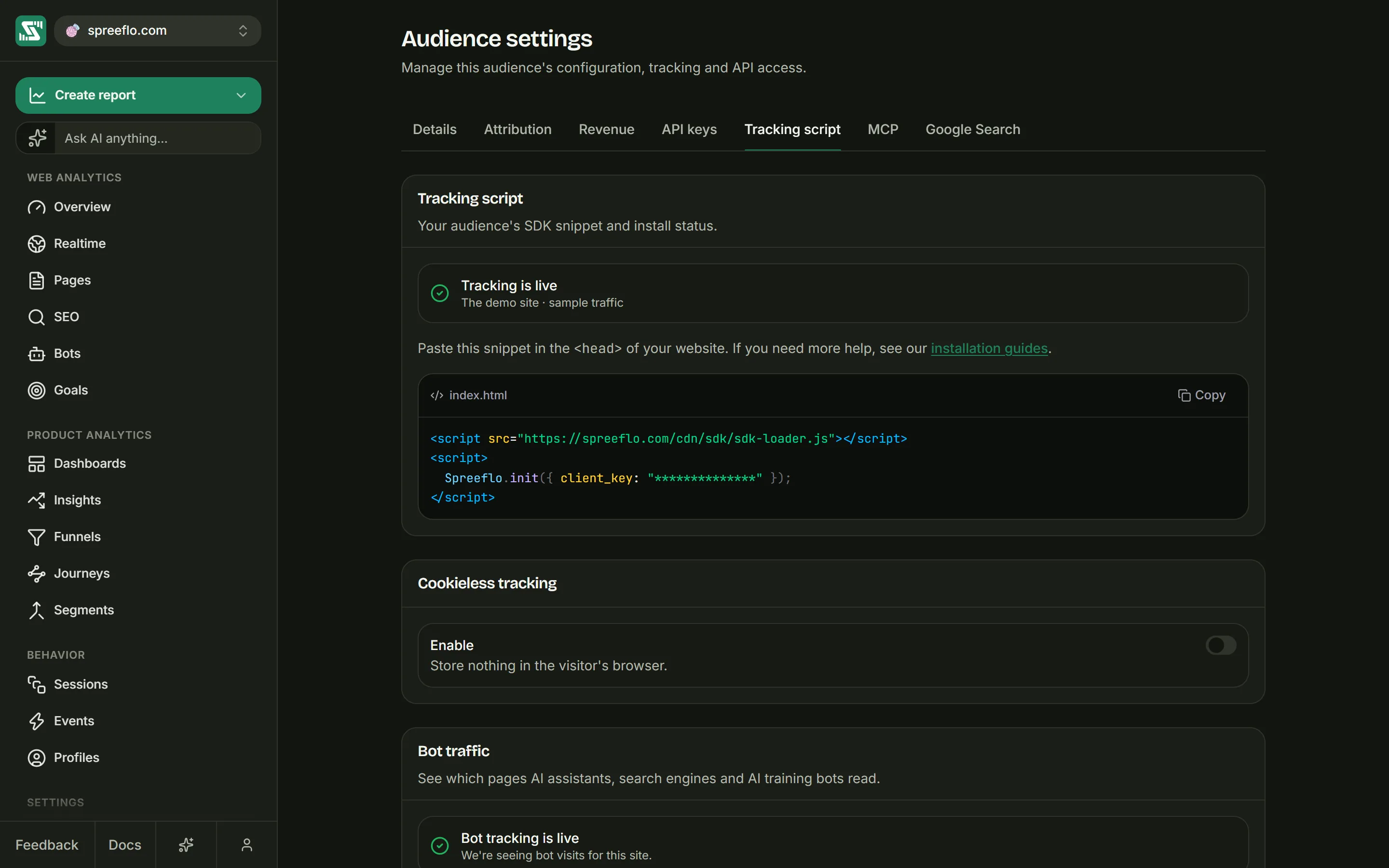
You need your audience's client key, the same one your tracking snippet uses. The easiest way to get code with the key already filled in is Settings → Tracking script: the Bot traffic section shows the install command, then 2. Add it to your code with a tab for each setup below.
Add it to your server
Express
Add the middleware early, before your routes:
const express = require('express');
const { createExpressAICrawlerMiddleware } = require('@spreelytics/ai-crawl');

const app = express();
app.use(createExpressAICrawlerMiddleware({ clientKey: 'YOUR_CLIENT_KEY' }));
It waits until your response has finished, then reports the crawl together with the status code you sent.
Next.js
Create middleware.ts at the root of your project:
import { NextResponse } from 'next/server';
import { createAICrawlerMiddleware } from '@spreelytics/ai-crawl';

const trackCrawler = createAICrawlerMiddleware({ clientKey: 'YOUR_CLIENT_KEY' });

export function middleware(request, context) {
  trackCrawler(request, context); // fire-and-forget; never delays the response
  return NextResponse.next();
}

export const config = { matcher: '/((?!_next/|api/).*)' };
The matcher keeps Next.js from running the middleware on its own files and your API routes. The
report goes out in the background through the runtime's waitUntil. Middleware runs before your page
answers, so these crawls are recorded without a status code.
Fetch handlers: Cloudflare Workers, Hono, Deno and Bun
Wrap any function that takes a Request and returns a Response:
import { withAICrawlerTracking } from '@spreelytics/ai-crawl';

const handler = async (request) => new Response('…');

export default { fetch: withAICrawlerTracking(handler, { clientKey: 'YOUR_CLIENT_KEY' }) };
Your handler runs first. The crawl is then reported with the status code of the response it
returned, in the background when the runtime offers waitUntil.
Calling it yourself
Where none of the above fits, report a request by hand:
import { trackAICrawlerRequest } from '@spreelytics/ai-crawl';

await trackAICrawlerRequest(request, { clientKey: 'YOUR_CLIENT_KEY' });
It checks the request, reports it if it is a crawl, and resolves once the report is answered. When you
already have the response, trackAICrawlerResponse(request, response, config) records its status code
too, and sends the report in the background.
The manual calls only send reports. The start-up signal that switches the app over to Bot tracking is live comes from the three wrappers above, so use one of them where you can.
Options
Only clientKey is required. The rest change what is reported and how:
| Option | Default | What it does |
|---|---|---|
clientKey | None | Your audience's client key. Required. |
enabled | true | Set to false to stop reporting without removing the code. |
disableAnswerFetch | false | Do not report AI answers crawlers, such as ChatGPT-User. |
disableSearchCrawlers | false | Do not report indexing crawlers, such as Googlebot and Bingbot. |
disableTrainingCrawlers | false | Do not report training crawlers, such as GPTBot and CCBot. |
disableOtherCrawlers | false | Do not report crawlers in the other category (see below). |
domain | The request's hostname | The domain a crawl is recorded under. |
publicOrigin | None | Your public address, such as https://example.com. Use it when your server sees an internal hostname, behind a proxy or inside a container, so pages are recorded under the real one. |
methods | ['GET', 'HEAD'] | Which HTTP methods to report. |
additionalIgnoredPathPrefixes | [] | More path prefixes to skip, added to the built-in list. |
additionalIgnoredExtensions | [] | More file extensions to skip, added to the built-in list. |
ignoredPathPrefixes | The built-in list | Replaces the built-in prefix list entirely. |
ignoredExtensions | The built-in list | Replaces the built-in extension list entirely. |
shouldTrackPath | None | A function (url, crawler) => boolean that has the last word. Return false to skip a request. |
getIp | Common proxy headers | A function that returns the crawler's IP address from the request. See Verified crawlers. |
maxUrlLength | 8192 | Page addresses longer than this are not reported. |
timeoutMs | 1500 | How many milliseconds a report may take before it is abandoned. |
apiUrl | https://sdk.spreelytics.com/1.0/ai-crawls | Where reports are sent. Change it only if you forward them through your own address. |
debug | false | Log to your server's console when a report cannot be sent. |
What is recorded
For each crawl, Spreelytics stores the page that was requested (its path with the query string), the crawler's company, its exact bot name, its category, the full user agent, the referrer when the crawler sent one, the status code your server answered with when it is known, and the crawler's IP address, which is used for the verification check.
Categories
Every known bot belongs to one of four categories. The app shows three tabs, and folds the fourth into Training:
| Category | Tab in the app | What it means |
|---|---|---|
answer_fetch | AI answers | An assistant fetched this page to answer someone's question, live. |
search_index | Indexing | A search or answer engine crawled the page so it can cite you later. |
training | Training | A crawler collecting pages as model training data. |
ai_crawler (other) | Training | A known AI crawler with no clearer purpose. |
In AI answers, crawls are named after the product a person was using: ChatGPT, Claude, Perplexity, Gemini, Copilot, Vibe, DuckDuckGo, Kimi, Amazon, Meta AI, Grok or Qwen. Google's agent and Read Aloud fetches are named Google. In Indexing and Training they are named after the company.
The crawlers it knows
Bots are matched by name anywhere in the user agent, ignoring letter case. Bots marked "other" fall in the other category and count under Training. The AI crawler list has a page for each bot its company documents, with its user agent, robots.txt token and how to check a visit is real.
| Company | AI answers | Indexing | Training |
|---|---|---|---|
| OpenAI | ChatGPT-User | OAI-SearchBot | GPTBot, OAI-AdsBot (other) |
| Anthropic | Claude-User | Claude-SearchBot | ClaudeBot |
| Perplexity | Perplexity-User | PerplexityBot | |
| Google-Agent, GoogleAgent, Google-NotebookLM, Google-GeminiNotebook, Google-Read-Aloud | Googlebot, Google-InspectionTool | GoogleOther, Google-Extended, Google-CloudVertexBot | |
| Microsoft | Copilot | Bingbot, msnbot | |
| Mistral | MistralAI-User | MistralAI-Index | MistralAI-Training |
| Apple | Applebot | Applebot-Extended | |
| Amazon | Amzn-User | Amzn-SearchBot | Amazonbot |
| DuckDuckGo | DuckAssistBot | ||
| xAI | xAI-SearchBot, Grok-DeepSearch | GrokBot, xAI-Bot, xAI-Grok, xAI-Web-Crawler, Grok (all other) | |
| Meta | meta-externalfetcher | Meta-WebIndexer | meta-externalagent, FacebookBot (other) |
| Moonshot AI | Kimi-User | Kimi-SearchBot | KimiBot |
| ByteDance | TikTokSpider | Bytespider, Doubaobot (other) | |
| Baidu | Baiduspider | ERNIEBot, YiyanBot (other) | |
| Alibaba | Qwen-User | QwenBot, TongyiBot (other), AliyunBot (other) | |
| Zhipu AI | ChatGLM-Spider | ||
| DeepSeek | DeepSeekBot | ||
| Cohere | cohere-ai, cohere-training-data-crawler | ||
| Allen AI | AI2Bot | ||
| You.com | YouBot | ||
| Common Crawl | CCBot |
Classic search engine crawlers such as Googlebot and Bingbot are on the list, under Indexing. Set
disableSearchCrawlers: true if you only want AI traffic.
A user agent that names one of these companies without matching a bot above, for example one that contains "claude" or "gemini", is still recorded, under the company's name.
What it skips
Before any network call, the package skips:
- requests from anything that is not a known crawler, which is all of your human traffic,
- methods other than
GETandHEAD, unless you changemethods, - requests for assets, which browsers and crawlers mark with a
Sec-Fetch-Destheader such as image, script, style, font or video, - paths that start with
/api,/_next,/_nuxt,/_astro,/static,/assets,/public,/images,/img,/fonts,/favicon,/build,/dist,/admin,/webhook,/webhooks,/cdn-cgior/.well-known. A prefix covers whole path segments only:/apiand/api/usersare skipped,/apiaryis not, - files ending in
.avif,.bmp,.br,.cjs,.css,.csv,.eot,.gif,.gz,.ico,.jpeg,.jpg,.js,.json,.map,.mjs,.mov,.mp3,.mp4,.otf,.pdf,.png,.svg,.ttf,.txt,.wasm,.wav,.webm,.webmanifest,.webp,.woff,.woff2,.xmlor.zip, - page addresses longer than 8,192 characters, or ones that are not
httporhttps.
Paths are compared in lower case.
Some files are always reported, even though their extensions are on the list, because they exist for
crawlers: /robots.txt, /llms.txt, /llms-full.txt, and sitemaps, meaning any .xml file whose
name contains "sitemap" and any .xml file under /sitemap/ or /sitemaps/.
PDFs are skipped by default. To count crawls of your PDFs, pass ignoredExtensions with the list
above minus pdf, because that option replaces the built-in list rather than adding to it.
Verified crawlers
Anyone can put "GPTBot" in a user agent. Spreelytics checks each crawl that claims to come from one of these bots against the IP address ranges its company publishes, which it refreshes every 12 hours: any OpenAI, Anthropic, Perplexity or Google bot, Bingbot and msnbot, MistralAI-User and MistralAI-Index, DuckAssistBot, Kimi-User, Kimi-SearchBot and KimiBot, and CCBot.
- Inside the published ranges: the crawl counts as verified.
- Outside them: it counts as spoofed. The Verified cell on the Bots page then reads "N spoofed", in red.
- From any other bot: it is not checked. That is not a warning sign.
The address comes from your server's view of the request. The package uses your getIp function if
you pass one, and otherwise the first of these headers that is present: cf-connecting-ip,
x-real-ip, true-client-ip, fastly-client-ip, fly-client-ip, x-vercel-forwarded-for,
x-forwarded-for (its first address). When none is present, the crawl is left unchecked. If your
hosting puts the visitor's address in a different header, pass getIp, or real crawlers may be checked
against the wrong address and look spoofed.
Check that it works
Open Settings → Tracking script and find the Bot traffic section. Before the package has started it reads Not set up yet, with the install steps underneath. Once it is running, the status turns to Bot tracking is live, "We're seeing bot visits for this site.", and the install steps disappear.
That happens as soon as one of the three wrappers handles its first request after your server starts, before any crawler has visited. Each server process sends this start-up signal once per client key.
To see a crawl arrive, request a page while posing as a crawler:
curl -A "GPTBot" https://www.example.com/
It shows up on the Bots page under Training: as OpenAI in the Crawlers list and as GPTBot
in the Bots list. Because the request came from your own address rather than one of OpenAI's, it
also counts as spoofed under Verified, which shows the check doing its job. Add debug: true to the options if nothing arrives, and watch your server's
console.
Where the data shows
- The Bots page opens with a strip of six numbers: Total crawls, AI answers,
Indexing, Training, Verified and Errors served. Click one of the three category
cells to switch the chart, which draws the top eight crawlers. Under it, Breakdown has two cards:
Crawlers, Bots and Companies, then Pages, Status codes and Referrers.
Errors served counts the crawls your server answered with a 4xx or 5xx code: pages an AI asked
for and could not read. Status codes are only recorded by the Express and fetch handler setups and
by
trackAICrawlerResponse. See Bots. - The Bot traffic card on the Overview has the tabs AI answers, Indexing and Training, a switch between Crawlers and Pages, a chart of the top eight and a ranked list. Click a row to see its details. The card is not shown on public share links.
Crawls are stored apart from your visitor data. They never count as visitors, sessions or pageviews, and they do not count toward your monthly events.
Hiding the card
Before bot tracking is set up, the card offers Set up bot tracking and Hide this card. To hide it later, or bring it back, use the Show the bot traffic card switch in Settings → Tracking script: "Hides the card on your dashboard. We keep collecting the data either way." You need the editor or admin role. Hiding the card never stops collection.
Related
- Bots: read the Bots page in detail.
- Filter traffic: what keeps bots out of your visitor numbers.
- Tracking script: the browser side, for your human visitors.
- Audience settings: the Tracking script tab and the other settings tabs.