








Docs·Usage
Troubleshooting
When Spreelytics shows nothing, or less than you expect, the browser nearly always shows you why. Work through this page from the top: the install status in the app, then the script in the browser console, then the requests it sends, and then the list of common causes.
Start with the install status
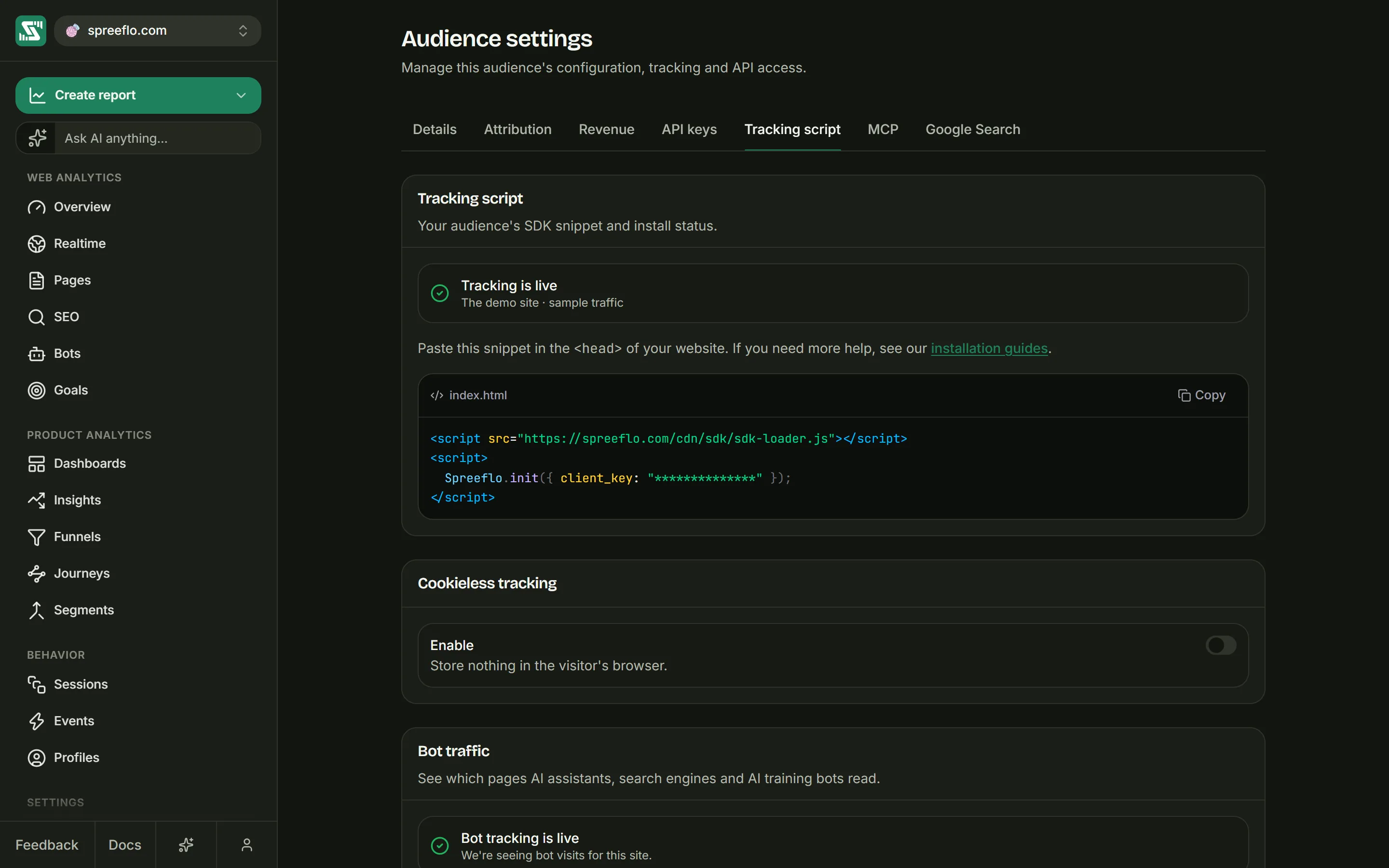
Open Settings → Tracking script and read the status at the top.
- Waiting for the first event: no signal has ever arrived from your site. Load a page of your site, come back and click Verify, which checks five times, two seconds apart.
- Tracking is live, with "Last seen" and a time: the script has reported in at least once, so its key was valid and its hostname was allowed. If data is missing even so, go to It works, but data is missing.
The signal behind the status is sent once each time the script starts on a page. It proves that the script loaded and was accepted, not that every pageview was recorded. An automated browser, for example, sends the signal but records no pageviews.
Check that the script loaded
Open your site, open the browser's developer tools (F12 on most systems), choose the Console tab and reload the page. A working install prints these lines, among whatever else your site logs:
[Spreelytics Loader] Initializing
[Spreelytics Loader] Stub created, ready for init()
[Spreelytics] Processing 1 queued commands
[Spreelytics Loader] SDK script loaded successfully
The number in the third line counts the calls that were waiting when the main script arrived, so it can be higher than 1.
- None of these lines: the loader is not on the page, or something blocked it. Check the page
source for the snippet, and the network tab for
spreelytics-loader.js. - Only the first two: the loader ran, but the main script never started. Either
Spreelytics.init()was not called, or it was called without aclient_key(the loader then fetches nothing and logs nothing more), or the main script was blocked. A line starting[Spreelytics Loader] Failed to load SDK scriptmeans it was blocked or could not be fetched. - All four: the script is running. Move on to the requests.
Two commands you can type into the console help as well:
typeof Spreelytics.trackLinkreturns"function"once the main script has loaded, and"undefined"while only the loader is there.Spreelytics.getVisitorId()returns an id starting withvid_once the script is running. On a cookieless audience it staysnulluntil Spreelytics has answered the script's install signal.
For a step-by-step log, add debug: true to the init call for a while:
Spreelytics.init({ client_key: "YOUR_CLIENT_KEY", debug: true });
The console then shows lines starting [Spreelytics] and [Spreelytics Tracker] for each step: the visit it
started, every page and event it sends, and a line such as Track page failed: 401 when Spreelytics
refuses a request. Take it out again when you are done.
Check the requests
Open the Network tab, reload the page and filter by sdk.spreelytics.com, or by your proxy's path
if you use api_host. Each page load sends these requests:
| Request | What it does |
|---|---|
track/config | Asks whether the audience uses cookieless tracking. |
track/heartbeat | The signal behind the install status. |
track/page | The pageview itself. |
track/stats | Reads back the visitor's counts, two seconds after each pageview. |
Then look at the status of track/page:
| Status | What it means |
|---|---|
200 | Accepted. On its own this does not prove the pageview was recorded: requests from bots, test browsers and data-center networks, and requests over the plan's limit, also get an empty 200 and are dropped. |
401 | Refused. The response only says Event API: Unauthorised, but there are three possible reasons: the request has no key, the key does not exist, or the page's hostname is not in Allowed domains. |
400 | The request was malformed: a field was missing, or one the server does not accept was added. With the standard snippet this usually means cookieless: true was set in init() on an audience whose switch is off, or that a proxy changed the request. |
Blocked, or (failed) with net::ERR_BLOCKED_BY_CLIENT | Your browser or an extension cancelled the request before it left. See Ad blockers and privacy browsers. |
| No requests at all | The main script is not running. Go back to the console. |
To find which of the three reasons is behind a 401, click the request and open its Payload tab
(in Firefox, Request). The form data starts with clientKey=. Compare that key with the one under
Settings → API keys. If they differ, fix the snippet. If they match, the page's hostname is
missing from Allowed domains.
Common causes
The hostname is not in Allowed domains
This is the most common cause of a 401. The hostname in the address bar has to match an entry
exactly: www.example.com and example.com are different entries, every subdomain (a staging site, a
preview deployment) needs its own, and localhost cannot be added at all. See
Allowed domains and Local development.
The key is wrong
Each audience has its own key. A mistyped key gets a 401. A key copied from a different audience is
accepted, and your data lands in that audience instead, so look there.
Calls made before Spreelytics.init() are lost
Anything you call before the init line, or push into the queue before the init command, is thrown
away. Calls made after init() but before the main script has loaded are kept, and sent once it is
ready. Keep your own calls below the snippet.
"Spreelytics.trackLink is not a function"
trackLink() only exists once the main script has loaded. Called earlier, it throws this error, which
also stops the rest of your code in that block. The queued form works at any time:
Spreelytics.push(["trackLink", document.querySelector("#pricing-cta"), { position: "hero" }]);
Ad blockers and privacy browsers
Blocked requests show in the network tab as blocked or failed, or do not appear at all, and the visitor is never counted. To confirm, load your site in a browser window without extensions. To count visitors who use blockers, you can send the script's requests through your own domain, but read the trade-offs in the Proxy guide first.
Content Security Policy
Console errors that start with Refused to load the script or Refused to connect come from your
site's Content Security Policy. Add the hosts listed under
Content Security Policy.
Testing with automated or headless browsers
Visits from test tools are not recorded, on purpose:
- Requests whose
User-Agentnames a headless browser, Lighthouse, Puppeteer, Playwright or PhantomJS, or that come from a known bot, crawler, command-line tool or HTTP library, get an empty200and are dropped. PageSpeed Insights runs Lighthouse, so its visits are dropped too. - In a browser controlled by automation, which Selenium, Playwright and Puppeteer all mark with
navigator.webdriver, the script does not track at all. It still sends its install signal, so Tracking is live can appear while no pageviews arrive.
Test by hand, in an ordinary browser.
Testing from a cloud machine or through some VPNs
Requests from the IPv4 address ranges of AWS, Google Cloud, Oracle Cloud, DigitalOcean and Linode are
dropped as data-center traffic, with an empty 200. The known consumer VPN services that run on those
networks are taken out of the list, so most VPN users are counted. A remote desktop, a CI runner or a
less common VPN that connects from one of those networks records nothing.
Testing with curl or a script
Requests from command-line tools and HTTP libraries, such as curl or Python's requests, are
dropped in the same way. Test from a browser.
The cookieless switch has not taken effect
Browsers can keep the audience's previous setting for up to a minute after you change Cookieless tracking. If the check takes longer than 2.5 seconds or is blocked, the script uses the cookie for that page load. See Cookieless tracking.
Every hash route shows as one page
Spreelytics stores the path in front of the #, so an app routed as /#/settings and /#/billing
shows a single / on the Pages report. See Single-page apps.
It works, but data is missing
The date range or a filter hides it
The date range starts at Last 30 days. The range you pick and any filters you add stay in place as you move between pages, with each filter shown as a pill under the toolbar. Check both before you look further, and use Clear all to remove every filter.
The numbers differ from another tool
Two analytics tools rarely agree, and the reasons are usually in how each one counts. In Spreelytics, a visit ends after 30 minutes without activity, time only counts while the tab is visible, and a bounce is a visit with one page and no interaction. Bots, test browsers and data-center traffic are dropped. A visit lives in one browser tab, so opening your site in a second tab usually starts a second visit. Blockers also block some tools and not others. Definitions explains every number.
Recording has stopped: over the plan limit
When a workspace goes well past its monthly events allowance, new pageviews and events stop being
recorded until the period resets: at three times the allowance on plans of up to 1 million events a
month, and at one and a half times above that. The requests still get a 200. A banner at the top of
every page says that new events are no longer being recorded, and admins get an Upgrade now
button. See Billing.
Related
- Tracking script: the snippet, Allowed domains and Content Security Policy.
- Proxy guide: count visitors who use ad blockers, and what it costs.
- Definitions: how each number is counted.
- Billing: allowances and what happens when you go over.