








Docs·Feature guides
Realtime
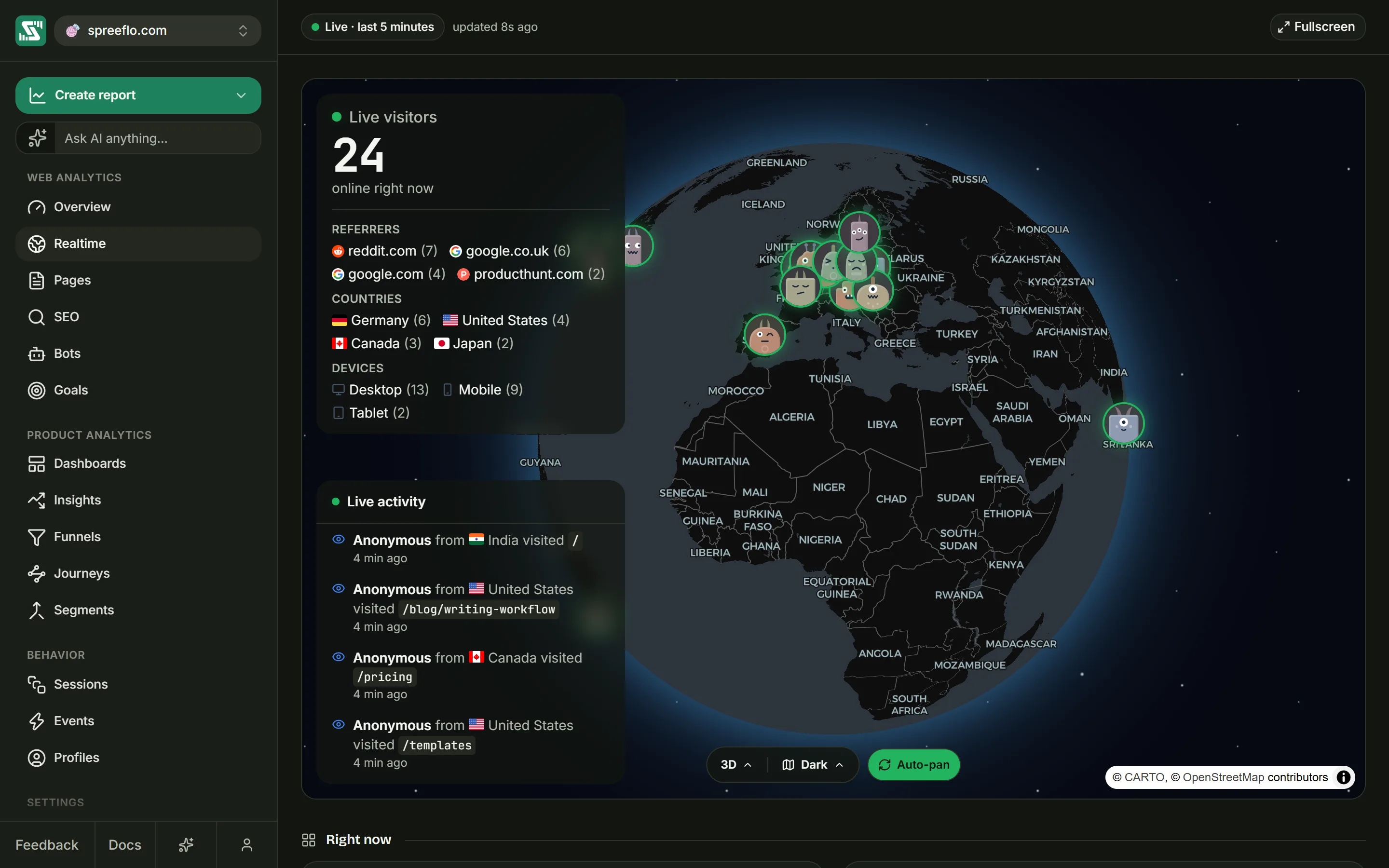
Realtime answers one question: who is on your site at this moment, and what are they doing? It puts every live visitor on a globe, counts them, streams their page views and events as they happen, and sums up where they came from and which pages they are on.
Open it from Realtime in the sidebar, or click the "online" chip in the toolbar of most pages.
What counts as live
A visitor is live when one of their visits has had any activity in the last 5 minutes: a page view, an event or any other update to the visit. They stay live for those 5 minutes even if they switch to another tab or close the page, then drop off once the visit has been quiet for 5 minutes.
The page fetches fresh numbers every 30 seconds by itself. You never need to reload it.
Realtime has no date range, no interval and no filters. Filters you set on other pages are not shown here and do not apply, but they are kept and come back when you leave. The count on this page is the same one the "online" chip in the toolbar and the Online cell on the Overview show.
The bar
The bar at the top shows a pulsing Live · last 5 minutes pill and how long ago the numbers were refreshed: "updated just now", then "updated 12s ago" and so on.
Fullscreen on the right fills the screen with the globe, with the counter and the feed floating over it. Click Exit to go back.
The globe
Each live visitor appears as an avatar at their location. Visitors in the same place share one spot, with up to 5 avatars overlapping and the rest gathered into a "+" circle with a count. A visitor whose location is not known yet still counts in the totals, and may appear on the globe on a later refresh.
Drag the globe to turn it. The toolbar along its bottom edge has three controls:
| Control | What it does |
|---|---|
| 3D or 2D | Switches between the globe and a flat map. |
| Map style | Dark, Streets or Light. It follows the app's light or dark theme until you pick one yourself. |
| Auto-pan | Turns the globe slowly. It stops when you open a visitor or jump to one from the feed; click it again to restart. |
"Loading globe…" shows while the map loads.
The visitor card
Click an avatar to open its card:
| Part | Shows |
|---|---|
| Name | The visitor's email if you have identified them, otherwise "Anonymous". Click it to open their profile in a new tab. |
| Revenues | A badge for visitors who have spent money with you, after refunds |
| Location and technology | Their city (or country), operating system, device and browser |
| Referrer | Where their current visit came from, or "Direct" |
| Current URL | The last page they viewed |
| Session time | How long their current visit has lasted; it keeps counting while the card is open |
| Total visits | How many visits they have made to this audience, ever |
Opening a card stops Auto-pan and switches the activity feed to that visitor. Beside the ✕, which closes the card, Open full session goes to the page of the visit they're on.
Live visitors
The panel at the top left shows Live visitors, the count, and "online right now". Under the count it lists the top 4 sources, the top 4 countries and the top 3 device types among the people online, each with a count.
Live activity
The panel at the bottom left is Live activity, a feed of what live visitors are doing:
- "Anonymous from France visited /pricing" for a page view.
- "jane@example.com performed signup_completed" for any other event.
Each row says how long ago it happened. Every refresh fetches the 50 most recent events from the current visits of everyone online, and the feed reveals the ones it has not shown yet one at a time, less than a second apart. The newest row is at the bottom, and the list keeps itself scrolled to it unless you scroll up to read older rows. It holds the last 40 rows.
Click a row to fly the globe to that visitor. This also stops Auto-pan.
Following one visitor
Click an avatar on the globe and the feed changes to "Showing events for" followed by the visitor's name, listing up to their 30 most recent events in their current visit. The ✕ at the top of the feed goes back to everyone.
Right now
Under the globe, the section Right now has two cards built from the same live snapshot:
- The first has three tabs. Referrers groups live visitors by the source of their current visit, Countries by country, and Devices by device type.
- Current Pages counts the page each live visitor viewed last.
Each card has a Search box and a footer such as "3 of 12", saying how many rows match out of how many there are. Point at a row to see its share of the total. Rows do not filter anything. An empty card says "Nothing here right now.", or "Nothing matches that search." when the search finds nothing.
Related
- Overview: the same visitors over any date range.
- Sessions: every page and event of a visit once it is over.
- Identify users: show names instead of "Anonymous".