








Docs·Feature guides
Insights
The Insights page lists the parts of your traffic that changed a lot recently. Once a day, Spreelytics compares each channel, referrer, country, device type and entry page with its own recent past, and writes a card for every one that rose or fell by enough to matter. There are no rules to set up, and a steady week leaves the page empty.
Every card is plain arithmetic on your sessions: the title, the summary and the numbers are worked out without any AI. When you want an explanation, a card can hand the question to the AI assistant.
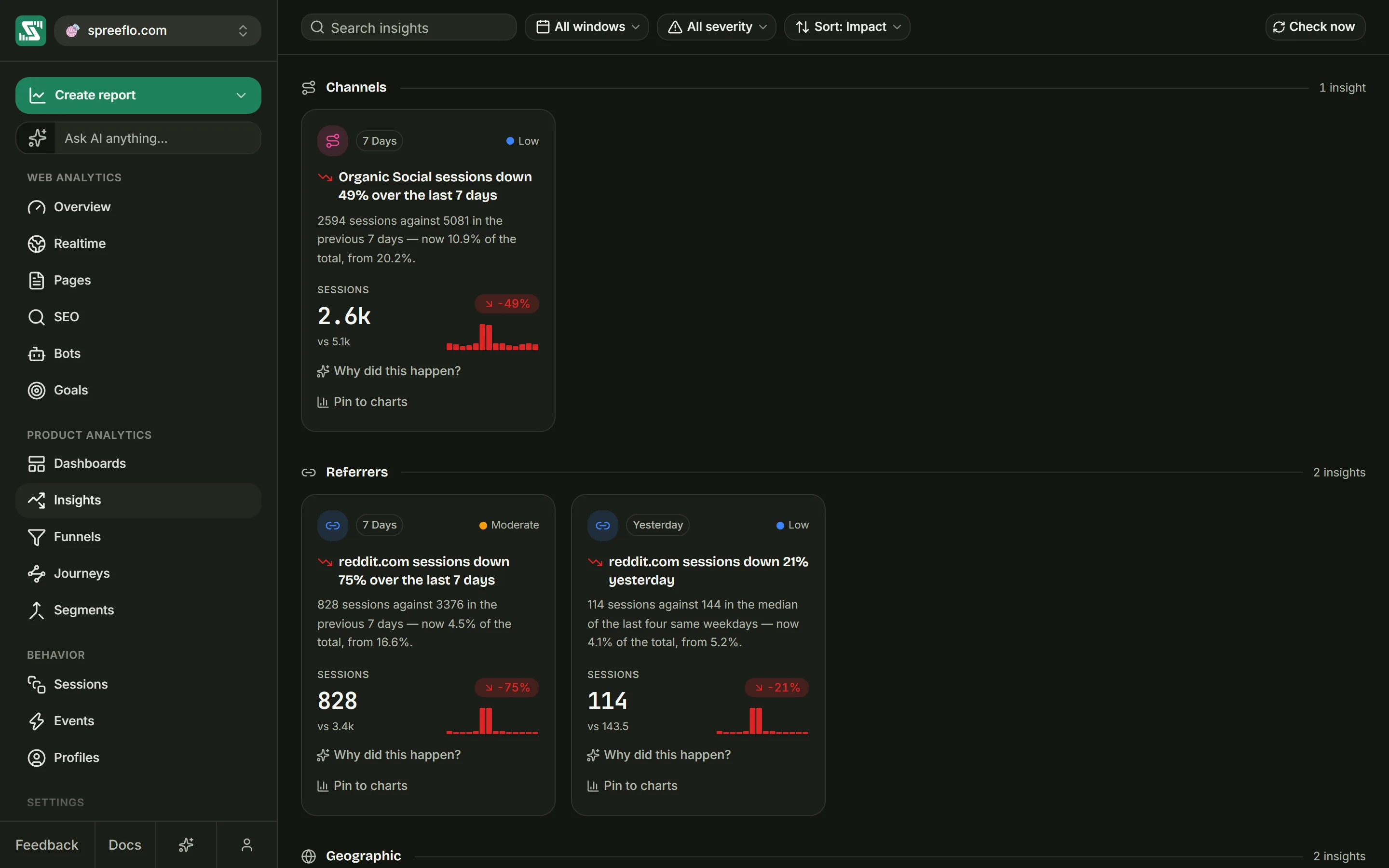
What Insights watches
The page has up to five sections, always in this order. A section with nothing to report is left out.
| Section | Each card is about | Counted in |
|---|---|---|
| Channels | One channel, such as Organic Search, Direct or Paid Social | Sessions |
| Referrers | One referring source, such as Google | Sessions |
| Geographic | One country, named by its two-letter code, such as DE | Sessions |
| Devices | One device type: Desktop, Mobile or Tablet | Sessions |
| Pages | One entry page, the page a session started on | Entries |
An entry is a session that started on that page. A Pages card says how many visits began there, not how many times the page was viewed.
A visit with no referrer has no source to name, so a change in direct traffic only ever shows under Channels, as the Direct channel, and never under Referrers.
The counts come from every session recorded for the audience. This page has no date range and no Filter button, because each card carries its own time window. Filters you set on other pages stay visible as grey pills, with the tooltip "Filter not active for this page".
How an insight is detected
Three windows
Every section is checked over three windows. The same channel can therefore have up to three cards, and they can disagree: Organic Search can be up yesterday and down over the last 30 days.
| Window | Counts | Compared with |
|---|---|---|
| Yesterday | Yesterday | The median of the same weekday in each of the four weeks before |
| 7 Days | The last 7 full days | The 7 days before those |
| 30 Days | The last 30 full days | The 30 days before those |
Every window ends yesterday. Today is never counted, because a day that is still going always looks like a collapse. Days are calendar days in UTC, not in your audience's reporting timezone.
The Yesterday window compares a day with the same weekday, because comparing a Saturday with the Friday before it would report a crash every weekend. It takes the median, the middle value, of the last four of them, so one unusual week does not throw the comparison off. For example, if Organic Search brought 180 sessions yesterday, a Tuesday, and 120, 130, 140 and 400 on the four Tuesdays before, the baseline is 135 and the change is +33%. The one big Tuesday makes no difference.
The rules a change has to pass
A change becomes a card only when it passes every rule below.
| Rule | Pages | Every other section |
|---|---|---|
| The window and its baseline add up to at least | 200 entries | 100 sessions |
| The count moved by at least | 40 entries | 20 sessions |
| The count moved by at least | 15% | 15% |
The volume rules keep a rise of 50% on six sessions off the page. Pages asks for more volume because a site has far more entry pages than channels or countries.
When something had no sessions at all in the baseline, the change counts as a rise of 100%, and the card's change badge reads new.
Severity
| Severity | Size of the change, up or down |
|---|---|
| Low | At least 15% and less than 50% |
| Moderate | At least 50% and less than 100% |
| Severe | 100% or more, which includes everything marked new and any drop to zero |
Ranking
Each section keeps at most 20 cards per window: the 20 with the highest impact. Impact is the percentage change multiplied by the natural logarithm of the volume behind it, meaning the window's count plus the baseline. A big move on a lot of traffic ranks first, but volume counts with diminishing returns. A 40% rise with 5,000 sessions behind it outranks the same rise with 200 sessions behind it by about 1.6 times, not by 25 times.
Sort: Impact uses this score. It is not shown on the card.
When detection runs
Detection runs once a day for every audience that had visits in the last two days. Check now runs it immediately for the audience you are looking at, then reloads the cards.
Each run replaces the one before:
- A change that is still true keeps its card, with refreshed numbers.
- A change that is no longer true loses its card.
- A new change gets a new card.
A card that keeps being found keeps the date it was first detected, which is what Sort: Most recent sorts by.
A run reads the last 60 days of sessions: the longest window plus its baseline. On a new audience the baselines are still partly empty, so expect large rises and cards marked new during the first weeks.
The filter bar
From left to right:
- Search insights matches the card's title, its summary and the name of what moved, such as
/pricingor Organic Search. - The window menu: All windows, Yesterday, 7 Days or 30 Days.
- The severity menu: All severity, Severe, Moderate or Low.
- The sort menu: Sort: Impact puts the highest impact first, and Sort: Most recent puts the cards that were first detected most recently at the top.
The search and the menus apply to every section at once, and each section's count follows them.
On the right, Check now runs detection and reads Checking… while it works. You need the Editor or Admin role to see it. Viewers read every card the last run produced, but cannot start a new run. In the demo, the run is refused.
Sections and counts
Each section header shows how many cards it holds: for example 3 insights when they are all on screen, or 4 of 9 when there are more. A section opens with up to four cards, one row on a wide screen. View more (5) adds four more at a time, and its number is how many are left.
Under the last section, Showing 12 of 30 insights totals every section.
Reading a card
| Part | What it shows |
|---|---|
| The icon in the corner | Which section the card belongs to |
| The window badge | Yesterday, 7 Days or 30 Days |
| The severity | A coloured dot and the word Severe, Moderate or Low |
| The title | What moved, in which direction and by how much, such as "Organic Search sessions up 24% over the last 7 days" or "/pricing entries down 31% yesterday". An arrow beside it points up or down. |
| The summary | Both counts and what the baseline was, then this item's share of its whole section now and in the baseline. For a channel, that is its part of all sessions with a channel. |
| The metric | The window's sessions or entries in large type, with vs and the baseline count under it |
| The change badge | The change in percent, green when it went up and red when it went down, or new when the baseline was zero |
| The bars | The last 14 days, one bar per day, ending on the window's last day. Hover a bar to read that day. |
| The buttons | Why did this happen? and Pin to charts |
Why did this happen?
Why did this happen? opens the AI assistant in a new chat and asks it why, passing along the card's title and its two counts. The answer appears in the assistant's panel.
The assistant is part of the Growth plan (see Billing). On the Free plan the panel opens with AI is on the Growth plan and an Upgrade plan button, and nothing is sent. Every role can use it, viewers included. In the demo, the panel describes the assistant instead of answering.
Pin to charts
Pin to charts turns the card into a reference: a dated note drawn on your charts, so whoever reads them later can see what happened. The reference takes the card's title as its title and the summary as its description. It is dated on the first day of the card's window: yesterday for Yesterday, or the first of the seven days for 7 Days.
Once the card is pinned, the button reads Pinned and cannot be clicked. The page looks for a reference with the same title on the same day, so a card cannot be pinned twice, even after a reload. Delete that reference on the References page and the card can be pinned again. After the next daily run the window has moved on and the numbers usually change, so the same card may offer Pin to charts again, as a new reference.
Pinning saves a reference, so it needs the Editor or Admin role.
When the page is empty
- Nothing stands out right now means no change passed the rules. A quiet site is a normal result, not an error. Editors and admins also get a Check now button here.
- "Try a different window, severity or search term." means the search or the menus are hiding every card. Set them back to All windows and All severity, or clear the search.
Related
- References: what Pin to charts creates, and where it is drawn.
- Overview: the same channels, countries and devices over any date range.
- Definitions: how sessions and channels are counted.
- List insights: read the same cards from your own code.